
Hard drive destruction · Dallas–Fort Worth
Hard Drive Destruction Service in Dallas–Fort Worth
CompletePC-World provides a free hard drive destruction service for Dallas–Fort Worth businesses. Every hard drive and SSD is collected from your site and then shredded or securely wiped so the data cannot be recovered. There is no minimum, and pickup usually takes place within 24 hours of your call.

Free drive pickup from your office
Loose drives or drives still in devices
Physical shredding or secure wiping

Why Does Data Destruction Matter for Texas Businesses?
Hard drive destruction is the permanent removal of data from storage devices, by secure wiping or physical shredding, so it cannot be recovered. CompletePC-World has destroyed business drives for Dallas-Fort Worth companies since 2020.
Deleting files or reformatting a drive does not remove the data. Free recovery tools can pull information from a drive that looks empty, and a hammer or drill leaves readable sections behind. For medical practices, schools, and any business holding customer data, verified destruction protects you after the hardware leaves your hands. See the NIST Guidelines for Media Sanitization.
Texas law also expects it: the Texas Business and Commerce Code requires businesses to destroy customer records that contain sensitive personal information before disposing of them, and a hard drive full of those records counts.
- Platters and flash chips shredded
- SSDs shredded, never just degaussed
- Drives pulled from devices on site
- Proof of destruction on request
What Storage Devices Do We Destroy?
We destroy every common type of business storage media, whether it is still inside a computer or already removed: hard disk drives, solid-state drives, external and portable backup drives, laptop drives, and server drives.

Hard Disk Drives (HDD)
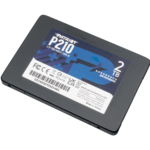
Solid-State Drives (SSD)

External Hard Drives

Portable Backup Drives

Laptop Storage Drives
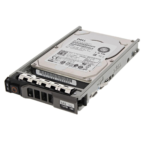
Server Drives
Who Uses Hard Drive Destruction Services?
DFW organizations need secure drive destruction when they replace computers, decommission servers, close or move an office, or clear out old storage devices. We work with offices, medical and dental practices, schools, IT departments, law firms, accounting offices, and nonprofits across the Metroplex. If you are planning a refresh, our surplus IT equipment guide shows how to separate data-bearing devices first.
What Happens During Hard Drive Shredding?
Every drive is either securely overwritten or physically shredded by our processing partner. Shredding breaks platters and flash chips into fragments that cannot be reassembled or read.
SSDs need different handling than spinning drives because degaussing does not work on flash memory, so SSDs are physically shredded rather than wiped. The leftover metal and plastic is sent to responsible recyclers.
How Does Our Hard Drive Destruction Process Work?
1. Schedule a Free Pickup
Give us a rough drive count and your address by phone, email, or the form below. Most pickups are scheduled within 24 hours.
2. We Collect On-Site
We pull drives from computers and servers if needed, or take the whole units. Your team does not need to remove anything.
3. Every Drive Logged
Drives are counted and kept together from your building to destruction, so none are mixed with general recycling.
4. Wipe or Shred
Each drive is overwritten or shredded so the data cannot be recovered, then the materials are recycled.
What Do You Receive After Destruction?
Tell us how many drives you have and whether any must be shredded rather than wiped. If your auditors need specific paperwork, ask when you book and we will tell you what we can provide.
Retiring whole servers? See our server recycling service. Clearing out an office? See IT asset disposition.
How to Prepare Drives for Destruction
- Count the loose drives, or the devices that still hold them, before you call.
- Keep loose drives in a locked bin or room until the crew arrives.
- Mark any drives that must be shredded rather than wiped, such as those holding patient or financial records.
- Check your record-retention rules before handing over drives that may still be needed.
- Keep your own asset list so you know which drives left the building.
Send us a rough drive count and your address, and we will collect every drive for secure destruction at no cost.
Where in DFW Do We Pick Up Drives?
Medical offices, law firms, schools, and other businesses in Dallas, Collin, Denton, Tarrant, and Hunt counties can have old hard drives and SSDs collected free by our Garland-based team.
There is nothing to box up or mail, and drives can stay inside their computers. We collect from your office, clinic, or server room. Whether you have five drives or five hundred, pickup is coordinated around your location and schedule.
Five drives to five hundred
No minimum quantity
Drives collected on site
Loose drives or whole devices
Any quantity
Five drives or five hundred
Quick collection
Most drive pickups happen within a day of your request.
- No drives left in storage
- Logged before leaving your site
Hard Drive Destruction Service Areas in DFW
These are the Dallas-Fort Worth cities where we collect drives for secure destruction at no cost.
The same cities also get server recycling, IT asset disposition, computer and laptop recycling, monitor and printer recycling, networking and telecom recycling and business electronics pickup.
Hard Drive Destruction FAQ
Is hard drive destruction free?
Yes. There is no charge per drive, no minimum quantity, and no pickup fee anywhere in Dallas-Fort Worth.
Is shredding better than software wiping?
Shredding is the safest option for drives that will not be reused. Software wiping can miss hidden sectors or fail on damaged drives, while shredding destroys the platters and flash chips completely.
Can data be recovered after a drive is shredded?
No. Once a drive is shredded, the platters and chips are broken into fragments that no software or lab technique can read.
How do you handle SSDs?
SSDs are physically shredded. Degaussing does not work on flash memory, so we do not rely on it for SSDs.
Do we get proof of destruction for audits?
Ask when you book. Tell us what your auditors or compliance team need, and we will confirm what records we can provide for your pickup.
Do I need to remove the drives first?
No. We can pull drives from computers and servers on-site, or take the whole units.
How fast can you pick up our drives?
Most drive pickups are completed within 24 hours of your request.
What is the difference between wiping, degaussing, and shredding?
Wiping overwrites the data with software so a working drive can be reused. Degaussing erases magnetic hard drives with a strong magnetic field but has no effect on SSDs. Shredding physically breaks the drive into fragments and works on every type of media.
Can old hard drives be recycled?
Yes. Once a drive is wiped or shredded, its metal and parts are sent for recycling. Hard drive recycling only happens after the data is gone.
Get in touch
Schedule Your Free Hard Drive Pickup
Phone: (945) 220-1585
Info@completepcworld.net